

01 / 03
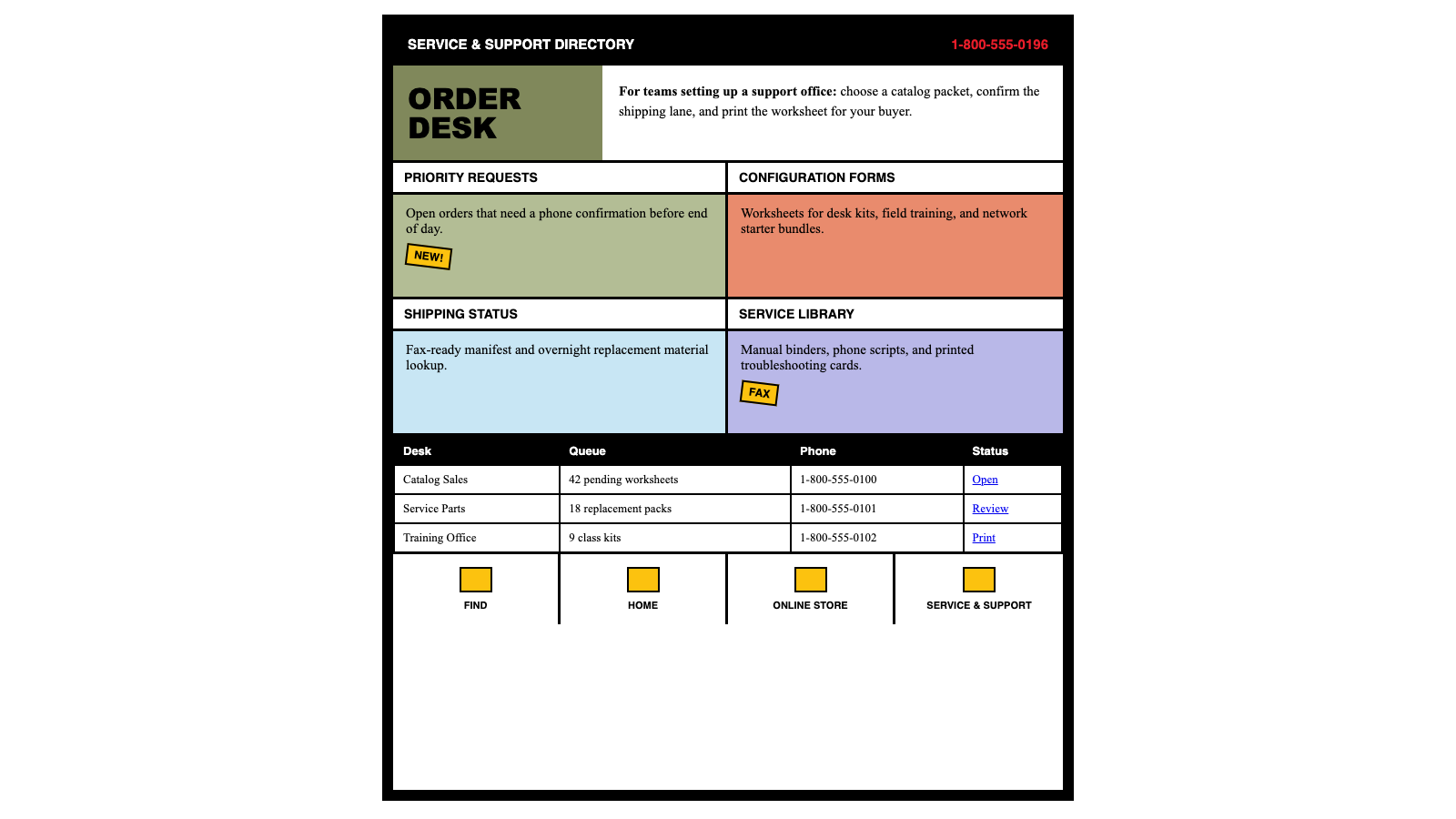
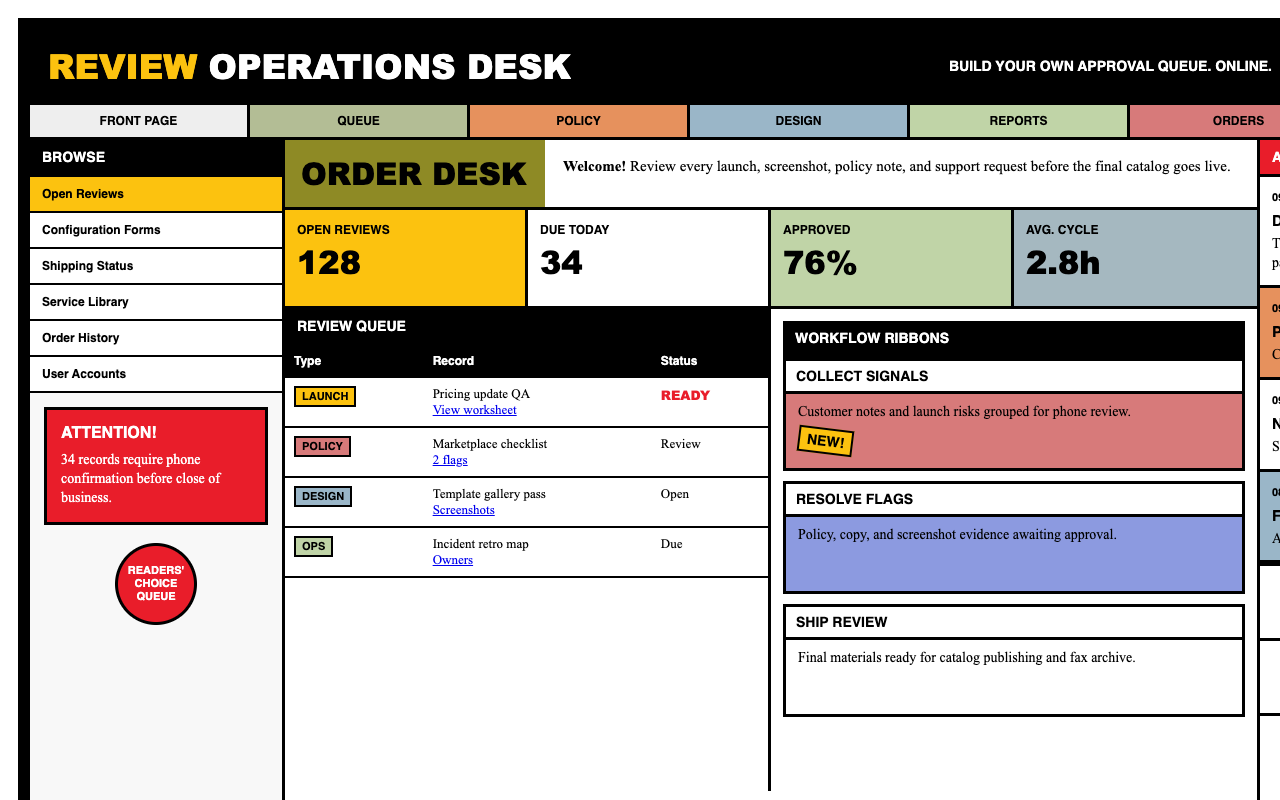

适合复古科技、怀旧活动和实验页面,黑框、Times 正文和彩色 ribbon card 呈现早期网页目录感。
设计语言样张
BUILD YOUR OWN COMPUTER. ONLINE.
正文保持浏览器默认 serif 质感,像早期企业目录页和说明书。
White title bar, black rule, tinted body block.
保留黑色页面外框,把页面当作 760px 固定宽目录页。
用 Arial Black 做粗重分类标题,用 Helvetica 做 UI 标签,用 Times New Roman 写正文。
每个业务块使用白色标题条 + 彩色 ribbon body + 1px 黑色表格线。
红色只用于电话、主 CTA 和奖章;黄色只用于贴纸。
不要软化任何圆角,除圆形奖章外所有元素都是 0px。
不要使用现代阴影、模糊、渐变或 Inter 等 webfont。
不要把红色扩展成普通装饰色或多处 CTA。
不要把经典蓝链接改成按钮或现代导航样式。
---
version: alpha
name: "Dell 1996"
description: "Dell 1996 的 DESIGN.md 中文参考模板,保留原始 design token 与专业术语,覆盖 color system、typography、layout、components、motion 与 interaction states。"
language: zh-CN
sourceLanguage: en
---

## 概览
Dell 1996 年 12 月的 home page 是 catalog-era enterprise web design 的完美化石:一个 Fortune-100 brand 认为 web 已经 *重要到值得投入* 的时刻,但那时距离 CSS 广泛采用还有两年,距离 “design system” 成为常用词还有三年。页面上每个视觉选择都是这些限制的下游结果:layout 依靠 HTML table,type 依靠浏览器内置 font stack(Arial Black / Helvetica / Times Roman),color 依靠 8-bit-safe flat fill,decoration 依靠手工裁切 GIF “sticker”(NEW! burst、圆形 PC Magazine Readers' Choice seal、带 bevel 的 “BUY a DELL” yellow tab)。页面被加框,是真的被 1-cell-wide black HTML table 加框;在这个 frame 内,每条 product line 都获得一张 “ribbon card”:white title bar 加 sharp black underline、八种 catalog color 之一(sage、salmon、peach、lime、sky、steel、periwinkle、olive)的 tinted body block,以及卡片右边缘嵌入的 beveled product photograph。

Brand voice 通过两个 anchor 贯穿:homepage 左侧 vivid Dell-red CTA panel(cream-yellow Times Roman copy 放在 `{colors.primary}` fill 上,并置于 black frame 内),以及固定在每页右上角的尖锐 red phone number:`1-800-213-DELL`。因为在 1996 年,网站本质上是以电话下单收尾的 brochure。Footer 是四个 hand-drawn icon-label(FIND / HOME / ONLINE STORE / SERVICE & SUPPORT)组成的一行,由 thin green horizontal rule 串联;一个 classic-Mosaic-blue、带 underline 的 “Copyright” link 位于 Times Roman legal small print 上方。

**Key Characteristics:**
- Literal page frame:每个页面都位于 `{colors.frame-ink}`(black)外框内,厚约 8 px;设计把浏览器窗口当作 printed picture frame。
- Flat color-block “ribbon card” 用专属 catalog color 给每个 product family 着色(`{colors.tint-sage}` Latitude、`{colors.tint-salmon}` OptiPlex GX、`{colors.tint-periwinkle}` PowerEdge、`{colors.tint-sky}` Dellware 等);没有 gradient、没有 shadow、没有 opacity。
- Section title block 使用 `{typography.display}`(Arial Black 36 / weight 900)的 chunky display typography;product row title 使用 `{typography.heading-2}`(Helvetica Bold 16);其他全部使用 `{typography.body}` Times Roman 14。
- Hand-cut GIF “sticker” 叠在 layout 上:右上角 yellow “BUY a DELL” tab、新 product row 上倾斜的 “NEW!” burst、圆形 red PC Magazine Readers' Choice seal。
- `{colors.primary}`(Dell red)只保留给两件事:homepage CTA panel 与右上角 phone number,绝不作 decorative。
- Footer icon-nav 带 classic-blue(`{colors.link}` #0000ee)anchor underline,这是 unmistakable Netscape 3.x link colour。

## Colors

### Brand & Accent
- **Dell Red** (`{colors.primary}` — #e91d2a): 品牌 signature red。保留给 homepage CTA panel(“At Dell.com, we'll help you find the right system…”)、右上角 phone number,以及 PC Magazine Readers' Choice seal ring。绝不作为 card body fill。
- **Dell Yellow** (`{colors.yellow-sticker}` — #fcc20f): Sticker yellow,用于 top banner 中的 “BUY a DELL” tab,以及 overlap new product row 的倾斜 “NEW!” burst。
- **Dell Purple** (`{colors.purple-stripe}` — #6a26a4): Lowercase “.com” / “DELL” wordmark text 背后的 accent stripe,只出现在 “BUY a DELL” sticker chrome 内。

### Surface
- **Frame Ink** (`{colors.frame-ink}` — #000000): Pure black。用于 page frame、top banner background、button fill,以及所有 1 px ribbon-card hairline。
- **Canvas** (`{colors.canvas}` — #ffffff): Frame 内的 true white。用于 page surface、ribbon-card title-bar fill 和 icon-label nav backdrop。

### Text
- **Ink** (`{colors.ink}` — #000000): Body text、heading、访问前 link copy。Pure black;1996 年没有 warm-near-black softening。
- **Link** (`{colors.link}` — #0000ee): Classic Mosaic / Netscape 3.x default link blue。用于带 underline 的 inline anchor(“Copyright”、“(Terms of Use)”、inline “from Dell's award-winning service and support teams”)。

### Ribbon-Card Tint Family
八个 catalog color,每条 product line 一个;它们构成页面的 chromatic personality:
- **Olive** (`{colors.tint-olive}` — #8e8a25): “DIMENSION DESKTOPS” eyebrow block
- **Sage** (`{colors.tint-sage}` — #b3bd95): Latitude Notebooks ribbon body
- **Salmon** (`{colors.tint-salmon}` — #d77a7a): “OPTIPLEX DESKTOP SYSTEMS” eyebrow + GX Series body
- **Peach** (`{colors.tint-peach}` — #e6915d): Dimension card body + OptiPlex Gs body
- **Lime** (`{colors.tint-lime}` — #c0d4a7): OptiPlex G Series body
- **Sky** (`{colors.tint-sky}` — #9ab6c8): Dellware ribbon body
- **Steel** (`{colors.tint-steel}` — #a5b8c0): Dimension XPS Pro ribbon body
- **Periwinkle** (`{colors.tint-periwinkle}` — #8c9ae0): PowerEdge ribbon body

这些 tint 饱和但不鲜艳,位于 true neutral chroma 下方,这是 GIF-era web-safe-palette quantization 的 signature。

## Typography

### Font Family

三个 system-stack family,没有 webfont(当时 webfont 还不存在):

- **Arial Black**(fallback: Helvetica, system-ui sans)— 只用于 display heading。Chunky stenciled section eyebrow(“DIMENSION DESKTOPS”、“OPTIPLEX DESKTOP SYSTEMS”)使用 Arial Black weight 900,all-caps,normal tracking。
- **Helvetica**(fallback: Arial, system-ui sans)— product-row title、button label、top banner 的 “BUILD YOUR OWN COMPUTER. ONLINE.” headline。始终 bold(700),始终 all-caps。
- **Times New Roman**(fallback: Times, serif)— body copy。每个 paragraph、caption、inline anchor 都使用默认渲染的 Times Roman。Serif 让设计瞬间带上年代感;modern web 的 body text 几乎不再使用 serif。

### Hierarchy

| Token | Size | Weight | Line Height | 用途 |
|---|---|---|---|---|
| `{typography.display}` | 36px | 900 | 1.0 | Section eyebrow title(“DIMENSION DESKTOPS”、“OPTIPLEX DESKTOP SYSTEMS”) |
| `{typography.heading-1}` | 24px | 900 | 1.05 | Sub-page hero headline |
| `{typography.heading-2}` | 16px | 700 | 1.2 | Top banner copy、product-line H1(“Reliable PC's for High-Performance Computing.”) |
| `{typography.heading-3}` | 14px | 700 | 1.2 | Ribbon-card title bar(“OPTIPLEX GX PRO”、“DIMENSION XPS”) |
| `{typography.body}` | 14px | 400 | 1.4 | Default paragraph copy、ribbon-card body、CTA-panel copy |
| `{typography.body-sm}` | 12px | 400 | 1.4 | “This site is best viewed with browser versions 3.0 and higher.” |
| `{typography.caption}` | 11px | 400 | 1.35 | Footer copyright text |
| `{typography.button}` | 12px | 700 | 1.0 | Button label、“NEW!” sticker、BUY-a-DELL sticker |
| `{typography.ui-label}` | 12px | 700 | 1.0 | Icon-label nav uppercase label(“FIND”、“HOME”、“ONLINE STORE”、“SERVICE & SUPPORT”) |

### Principles
- UI 用 sans,body 用 serif;这与现代惯例相反,也是 mid-90s typography 的明显特征。
- Display weight 极端(900 / Black),从不软化。“Dimension” / “OptiPlex” eyebrow block 依赖字体提供的最重 weight。
- 不做 letter-spacing tracking 调整;1996 年的 pixel-font 不适合这一套。所有内容都使用浏览器默认 kern。
- Display 的 line-height 很紧(1.0),body 则常规(1.4);这是 print-magazine catalog layout 的遗留。

### Font Substitutes
这三个 family 都是 1996 年各类 consumer OS 的 operating-system default(Windows 95:Arial / Times New Roman;Mac OS 7.5+:Helvetica / Times)。品牌没有 fallback strategy,因为不需要 fallback:这些字体始终存在。Modern reproduction 可以继续使用这套准确 stack(Arial Black / Helvetica / Times New Roman)来保持 authenticity。

## Layout

### Spacing System

- **Base unit**: 4 px(带 2 / 6 / 10 中间值)。1996 年 page layout 由 HTML table cell padding(`cellpadding="4"` / `cellspacing="0"`)驱动,而不是设计好的 scale。
- **Tokens**: `{spacing.xxs}` 2px · `{spacing.xs}` 4px · `{spacing.s}` 6px · `{spacing.sm}` 8px · `{spacing.m}` 10px · `{spacing.md}` 12px · `{spacing.lg}` 16px · `{spacing.xl}` 20px · `{spacing.xxl}` 24px · `{spacing.section-sm}` 32px · `{spacing.section}` 40px · `{spacing.section-lg}` 48px。
- **Card interior padding**: Ribbon-card body 使用 `{spacing.md}` 12 px vertical / `{spacing.lg}` 16 px horizontal。
- **Section vertical rhythm**: Product-ribbon stack 之间为 `{spacing.section}` 40 px;eyebrow color block 与第一张 ribbon-card 之间为 `{spacing.section-sm}` 32 px。

### Grid & Container
- Fixed-width table layout 固定在约 760 px 宽,这是 1996 年面向 800×600 monitor 并留出小 scrollbar gutter 的事实标准。
- Two-column outer structure:left rail(约 28%)承载 homepage icon-link grid + CTA red panel;right column(约 72%)承载 product ribbon stack。
- 没有现代意义上的 grid system;每个 section 都是自己的 `<table>` declaration,并带 hard-coded column width。

### Whitespace Philosophy
以现代标准看很紧。Catalog density 胜过 editorial breath;black frame 内的每个 pixel 都在工作(illustration、color block、headline、body)。补偿性的 decompression 发生在每张 ribbon card *内部*:white title bar + tinted body block + product photo notch 在不扩大整体页面的情况下创造内部呼吸空间。

### Responsive Strategy

#### Breakpoints
| Name | Width | 关键变化 |
|---|---|---|
| Period default | 800 × 600 | Fixed 760 px layout,为当时 standard monitor 设计 |
| Modern desktop | 1280+ px | Layout 居中,并带 generous side gutter,模拟“屏幕中央的 magazine spread” |
| Tablet | 768 px | Black frame 压缩到 4 px;ribbon-card 在内部 full width 堆叠 |
| Mobile | < 480 px | Black frame 为 2 px;two-column structure 折叠为 single column;left rail icon grid 堆叠到 right-column product stack 上方 |

#### Touch Targets
1996 年没有 touch 的概念;原始设计假设 mouse-only。Modern reproduction 需要在 mobile 上把 icon-label nav target 扩到最小 44 × 44 px(1996 年 icon 约 24 × 24,下方 8 px label,远低于现代 guideline)。

#### Collapsing Strategy
- 在 ≤ 768 px 时,homepage 的 left-rail icon-link grid(Online Store / Service / Why Dell? / Government / Worldwide / Order Status / Company Info / U.S. Careers)从 2 × 4 grid 折叠为 single-column stack。
- Ribbon-card 右边缘的 product photo notch 在 mobile 上变为 top-aligned full-width image。
- Top banner 的 tagline(“BUILD YOUR OWN COMPUTER. ONLINE.”)缩小一个 type tier;phone number 换行到 BUY-a-DELL sticker 下方。
- Footer icon-label nav 在所有宽度都保持 4-up;icon 足够小,可以存活。

#### Image Behavior
Product photo 是带手工 bevel shadow 的 bitmap GIF,按固定 pixel width 制作(通常 80–120 px 宽)。Right-edge notch effect 通过 table-cell negative spacing 实现。Modern reproduction 应保留 bevel shadow effect(这是 signature),但可以使用 SVG drop-shadow 或 CSS `filter: drop-shadow(2px 2px 0 #000)` 在 high-DPI 下清晰复现。

## Elevation & Depth

| Level | Treatment | 用途 |
|---|---|---|
| 0 — Flush | 无 shadow,无 border | Body text、copyright row、footer band background |
| 1 — Hairline | `1px solid {colors.frame-ink}` | Ribbon-card outer edge、table-cell divider |
| 2 — Frame | `8px solid {colors.frame-ink}` | 整个 viewport 周围的 page-frame border |
| 3 — Bevel | GIF sticker 与 product photo 上的 hard-edge 1 px highlight + 1 px shadow | “BUY a DELL” yellow sticker、NEW! burst、award seal、product photograph |

1996 设计中 **没有 soft shadow**;每个 depth cue 要么是 hard 1 px border,要么是 GIF 内手绘 bevel。需要 period-accurate 的 modern reproduction 必须克制添加 Material-style elevation 或 atmospheric drop shadow 的冲动。

### Decorative Depth
Bevel 与 frame 承载整个 depth vocabulary:
- **Page frame** 是最强 depth cue;它告诉 viewer “这是一个 contained document,不是 continuous canvas”。
- **Sticker 上的 bevel**(BUY a DELL、NEW!、PC Magazine Readers' Choice)让它们从页面 surface 上凸出,像用图钉钉上去。
- **Product photograph** 自带 hand-painted bevel + drop-shadow,直接 baked into GIF。

## Shapes

### Border Radius Scale

| Token | Value | 用途 |
|---|---|---|
| `{rounded.none}` | 0px | Universal default,用于 button、card、input、banner、page frame、ribbon-card body、eyebrow block |
| `{rounded.full}` | 9999px | Circular award seal(PC Magazine Readers' Choice)、HOME icon 上的圆形 “h” sticker |

1996 设计实际上只有 **两种** radius mode:square(几乎所有东西)与 round(decorative seal sticker)。没有 4 / 8 / 12 px 的 subtle radius tier;那套 vocabulary 属于 post-Bootstrap web。

### Photography Geometry
Product photo 是 rectangular GIF,自带 internal beveled “monitor” framing;它们以 native pixel dimension 放置,从不缩放。Aspect ratio 聚集在 4:3(当时标准 CRT shape)附近。此站点没有 avatar;员工摄影保留给这些 snapshot 未捕获的 “About Dell” page。

## Components

> **不记录 hover state。** 按全局 no-hover policy,下方每个 component 只记录 Default state。

### Frame & Banner

**`page-frame`** — 整个 viewport 周围的 literal black border。
- Background `{colors.frame-ink}`,四边 padding `{spacing.sm}` 8 px,无 radius。
- 页面位于这个 border *内部*。把它视为不可协商的 container chrome;mobile 上可以压缩(到约 4 px),但完全移除会丢失品牌。

**`top-banner`** — 横跨顶部的 pure-black strip,带 white “BUILD YOUR OWN COMPUTER. ONLINE.” headline + sub-tagline、右侧固定的 yellow “BUY a DELL” sticker,以及 red “1-800-213-DELL” phone number。
- Background `{colors.frame-ink}`、text `{colors.canvas}`、type `{typography.heading-2}`、padding 12 px vertical / 16 px horizontal,无 radius。

### Section Eyebrow Blocks

**`section-eyebrow-olive`** — 大型 tinted color block,承载 chunky stenciled section title(“DIMENSION DESKTOPS”)。用于 Dimension product page 顶部。
- Background `{colors.tint-olive}`、text `{colors.ink}`、type `{typography.display}`(Arial Black 36 / 900)、padding 24 × 16,无 radius。

**`section-eyebrow-salmon`** — 相同 chrome,但使用 OptiPlex line 的 salmon-pink fill(“OPTIPLEX DESKTOP SYSTEMS”)。
- Background `{colors.tint-salmon}`,其他与 olive variant 相同。

### Ribbon Cards

品牌 signature component。每个 product-row “card” 由三块堆叠而成:
1. **`ribbon-card-title`** — White horizontal title bar,使用 Helvetica Bold all-caps 展示 product variant name(如 “OPTIPLEX GX PRO”、“DIMENSION XPS”、“POWEREDGE SERVERS”)。底部为 1 px `{colors.frame-ink}` border。
   - Background `{colors.canvas}`、text `{colors.ink}`、type `{typography.heading-3}`、padding 6 × 12,无 radius。
2. **`ribbon-card-body-<tint>`** — 八种 tint 之一的 color-block body,承载 `{typography.body}`(Times Roman 14)的短 marketing pitch。Padding 12 × 16。Product photograph 通过 transparent GIF cutout 嵌入右边缘。
3. **Photo notch** — GIF 位于 row 最右侧约 25%,略微超出 body bar 上下边缘,像钉在 corkboard 上的卡片。

每个 tint variant 都是自己的 component entry。选择与 product family 匹配的一项:

- **`ribbon-card-body-sage`** — `{colors.tint-sage}` fill,用于 Latitude Notebooks row
- **`ribbon-card-body-salmon`** — `{colors.tint-salmon}` fill,用于 OptiPlex GX Series row
- **`ribbon-card-body-peach`** — `{colors.tint-peach}` fill,用于 Dimension row 与 OptiPlex Gs
- **`ribbon-card-body-lime`** — `{colors.tint-lime}` fill,用于 OptiPlex G Series row
- **`ribbon-card-body-sky`** — `{colors.tint-sky}` fill,用于 Dellware row
- **`ribbon-card-body-steel`** — `{colors.tint-steel}` fill,用于 Dimension XPS Pro row
- **`ribbon-card-body-periwinkle`** — `{colors.tint-periwinkle}` fill,用于 PowerEdge Server row

七种 variant 共享相同 chrome:1 px solid `{colors.frame-ink}` border、`{spacing.md}` × `{spacing.lg}`(12 × 16)padding、`{rounded.none}`(sharp corner)、内部使用 `{typography.body}` Times Roman 14。只有 fill color 随 product family 改变。

### Call-to-Action

**`cta-block-red`** — Homepage 上 vivid Dell-red panel(“At Dell.com, we'll help you find the right system, configure it, price it, and order it…”)。
- Background `{colors.primary}`、text `{colors.on-primary}`(white)、1 px solid frame-ink border、type `{typography.body}`(Times Roman 14)、padding 16 px,无 radius。
- 每页最多一个。它是品牌最 aggressive 的 attention-grab;除 top-tier sales message 外不要使用。

**`phone-callout`** — Top-right phone number(“1-800-213-DELL”),在 black banner 上以 red 渲染。
- Background `{colors.frame-ink}`、text `{colors.primary}`、type `{typography.heading-2}` Helvetica Bold 16、padding 4 × 8,无 radius。固定在每页 top banner 右侧。

### Stickers (GIF-style overlays)

**`buy-a-dell-sticker`** — Yellow rectangular sticker,Helvetica Bold 的 “BUY a DELL”,其中 “a” 放在小 purple stripe 中,“DELL” wordmark 为 black。固定在每页右上角。
- Background `{colors.yellow-sticker}`、text `{colors.ink}`、1 px black border、type `{typography.button}`、padding 4 × 8,无 radius。

**`new-burst-sticker`** — Angled yellow burst,Helvetica Bold black 的 “NEW!” 叠在 new product ribbon-card 右侧。轻微旋转(约 15°)带来 pinned-on-with-tape 的感觉。
- Background `{colors.yellow-sticker}`、text `{colors.ink}`、type `{typography.button}`、padding 4 × 8,无 radius(rotation 单独应用)。

**`cert-seal`** — Round red award seal:中心写 “PC MAGAZINE”,环绕 “SERVICE · RELIABILITY · READERS' CHOICE”,内部 white field,外部 red bordered ring。位于 product page 右 rail。
- Background `{colors.primary}`、text `{colors.canvas}`、type `{typography.button}`、rounded `{rounded.full}`、size 64 px。

### Navigation

**`icon-label-nav`** — 页面底部 navigation row:四个 hand-drawn icon(eyeglasses-FIND / house-HOME / yellow-sticker-ONLINE STORE / wrench-SERVICE & SUPPORT)由 thin green horizontal rule 连接,每个 icon 下方有 uppercase Helvetica label。
- Background `{colors.canvas}`、text `{colors.ink}`、type `{typography.ui-label}`,每个 icon-label pair 周围 padding 8 px,无 radius。
- 连接用 green rule 是 GIF imagery 的一部分,不是 CSS border。

### Inputs & Buttons

**`text-input`** — Bordered HTML input。White fill,1 px solid black border,内部 Times Roman 14。
- Background `{colors.canvas}`、text `{colors.ink}`、1 px solid frame-ink、type `{typography.body}`、padding 4 × 6,无 radius。
- 用于 Search 与 “Configure & Buy” form(这三张 capture 中不可见,但符合该年代 HTML 3.2 form widget)。

**`button-primary`** — Black filled button,带 white Helvetica Bold uppercase label。
- Background `{colors.frame-ink}`、text `{colors.on-primary}`、1 px solid frame-ink、type `{typography.button}`、padding 6 × 16,无 radius。

**`button-secondary`** — White filled outlined button。相同 chrome,但 colors inverted。
- Background `{colors.canvas}`、text `{colors.ink}`、1 px solid frame-ink、type `{typography.button}`、padding 6 × 16,无 radius。

**`button-text-link`** — Classic-Mosaic blue 的 bare underlined anchor。
- Text `{colors.link}` #0000ee、type `{typography.link}` Times Roman 14、默认 underline。无 padding,无 radius。

### Footer

**`footer-band`** — 每页底部:icon-label nav row、classic-blue Copyright link、“(Terms of Use)” parenthetical、browser-compatibility small print,以及 Microsoft BackOffice / Internet Explorer logo banner。
- Background `{colors.canvas}`、text `{colors.ink}`、1 px frame-ink top border、type `{typography.body-sm}`、padding 16 px。

### Examples (illustrative)

> Auto-derived kit-mirror demonstration surface(`scripts/derive-examples-block.mjs`)。每个 `ex-*` entry 都引用 brand-native primitive,让 downstream consumer(`/preview-design`、`/generate-kit`)能一致 re-skin 同一组 10 个 surface。`TO_FILL` marker 表示 primitive 缺失,需要在 LLM judgment pass 中解决。

**`ex-pricing-tier`** — 默认 Pricing tier card。复用 feature-card chrome,并使用 base white surface。
- 属性:`backgroundColor`, `textColor`, `borderColor`, `rounded`, `padding`

**`ex-pricing-tier-featured`** — Featured / highlighted tier,使用 polarity-flipped surface(light mode 中 dark fill + light text,dark mode 中 light fill + dark text)。
- 属性:`backgroundColor`, `textColor`, `rounded`, `padding`

**`ex-product-selector`** — What's Included summary card,改用于 SaaS / B2B vertical(不是 literal product gallery)。
- 属性:`backgroundColor`, `rounded`, `padding`

**`ex-cart-drawer`** — Subscription summary,改用于 SaaS / B2B(每个 add-on 一行 line item,不是 literal cart)。
- 属性:`backgroundColor`, `rounded`, `padding`, `item-divider`

**`ex-app-shell-row`** — App Shell 示例中的 sidebar nav row。Active state 使用 brand primary 作为 indicator。
- 属性:`backgroundColor`, `activeIndicator`, `rounded`, `padding`

**`ex-data-table-cell`** — 默认 data-table th + td chrome。Header 使用 mono-caps eyebrow typography;body 使用 body-sm。
- 属性:`headerBackground`, `headerTypography`, `bodyTypography`, `cellPadding`, `rowBorder`

**`ex-auth-form-card`** — Sign-in / sign-up card。复用 feature-card chrome,内部放置 text-input primitive。
- 属性:`backgroundColor`, `rounded`, `padding`

**`ex-modal-card`** — Modal dialog surface,与 feature-card 使用相同 chrome,并带 elevated shadow。
- 属性:`backgroundColor`, `rounded`, `padding`

**`ex-empty-state-card`** — Empty-state illustration frame。
- 属性:`backgroundColor`, `rounded`, `padding`, `captionTypography`

**`ex-toast`** — Toast notification surface,使用 feature-card shape + medium shadow。
- 属性:`backgroundColor`, `rounded`, `padding`, `typography`

## Do's and Don'ts

### Do
- 每页保留 literal `{components.page-frame}` black border;这是品牌最可识别的 container chrome。
- `{colors.primary}`(Dell red)只保留给 `{components.cta-block-red}` panel 和 `{components.phone-callout}`。任何其他用法都会稀释 urgency signal。
- 将八个 ribbon-card tint color(`{colors.tint-olive}` / sage / salmon / peach / lime / sky / steel / periwinkle)作为一个 *family* 使用;每条 product line 选一个,并在该 line 的 marketing surface 中保持一致。
- 每个 display headline 都使用 `{typography.display}`(Arial Black 36 / weight 900)。品牌 typographic register 依赖 extreme weight 与 flat color 的对比。
- Body copy 保持 `{typography.body}` Times Roman 14;替换为现代 sans 会完全失去 catalog feel。
- 每个 CTA / button 都渲染为 `{rounded.none}`(0 px)。现代 soft-radius button 会背叛这个年代。
- Sticker 与 product photo 使用 hand-painted bevel / hard-edge GIF shadow。绝不要替换成 soft CSS shadow。

### Don't
- 不要在 eight catalog tint + Dell red + Dell yellow + classic link blue 之外引入 chromatic accent。Palette 按设计就是封闭的。
- 不要软化任何 corner。`{rounded.none}` 是 universal modifier;只有 award seal 使用 `{rounded.full}`。
- 不要用 Arial / Helvetica / Inter / webfont 替换 Times Roman body;serif body 是这个年代的 signature。
- 不要添加 soft drop-shadow 或 atmospheric gradient。品牌使用 hard border 与 flat fill;其他都会显得 anachronism。
- 不要用 `border-radius` 或 `clip-path` crop / “tuck” product photo。嵌入 ribbon-card 右边缘的 notch 才是 framing;photo 本身保持 hard rectangle。
- 不要在同一页面放两个 `{components.cta-block-red}` panel。Red fill 应该是唯一 attention pole。
- 不要从 top banner 移除 `{components.phone-callout}`。1996 年网站存在的目的就是推动电话下单;phone number 本身就是 navigation。


